

Transcript:
(00:00) All right, guys. I'm incredibly excited for this video. I didn't even plan on making it, but I can hardly contain myself. I've been overflowing with an overabundance of energy and exuberance because what I showed you guys in my last video was actually just one of four mega projects that I've been working on.
(00:20) And in this video, I want to show you guys a little bit about project number three. So, brief recap of my four mega projects. Number one is the book. That's the Apex project and you can go read about it on my website and over time I'll have more information available about it. The second mega project is this six video initiatory arc for YouTube that's mostly done being written and um I hope to have complete sometime late summer early fall but the first video should be coming sooner than than that. And uh it's actually going to be a
(00:56) self-published monograph on Amazon and it will also be available for free on my website and on YouTube as a full video essay. very excited about that because that's what's going to draw people into the community which was mega project number four. Everything about the temple, the website, the curriculum I've been working on for 10 years and perhaps most importantly the quest forum.
(01:19) Do you guys remember how we used to go live on Google Hangouts and I just I just get on stream and we would talk about anything for hours? Well, we're going to replicate that with the Quest forum. That's where you're going to be able to interact with community members or if you have a question for me, you want to talk one-on-one, we can do that there through Discord, right? And so I'll have a link to the Quest forum in the description uh of this video.
(01:43) And anyway, that's like the main community container where we're going to be doing a lot of different things. That's that that's if you want to join whatever it is I'm doing, that's the that's the call to action is join the quest. Join the quest forum. And then mega project number three that I will only briefly touch on today because I could talk for hours and hours and hours is what I call the forge trinity.
(02:06) Basically I built an app right and it's called Adalon. And the premise is this that the digitization of life is an inevitability, right? And rather than sort of just mindlessly meandering into this increasingly dystopian situation where big tech and big data own everything and own all of our data and whatnot, we're moving increasingly toward this neo feudalistic techno dysistopia.
(02:36) I wanted to build an alternate paradigm. I wanted to build a prototype that preserved the dignity of our humanity. And so rather than being fragmented across half a dozen or a dozen different apps and services where you're dependent on whether or not you get deplatformed and they're going to be able to monitor what you're doing and you have to agree to their terms of service.
(03:01) And rather than that, I wanted to uh centralize everything and give you control back, give you sovereignty over your own data. Because right now, who owns your medical records? Who owns your finance records? Who owns your education records? And with the inevitability of quantum computing and blockchain technology, what's going to happen whenever traditional institutions get disintermediated, right? And so eventually longer term, I want to be able to take advantage of things like zero knowledge proofs and sigma protocols that would allow an individual
(03:34) to selectively disclose their data to whatever decentralized application that they'd want to use. So that's like longer term and a little bit more technical, but basically I created an app and I really hope to eventually give like offer this as something to the people that are part of this community. And then eventually if with the help of Claude code then after I've finished some other projects perhaps even create an app as a product that other people can purchase. Super excited about this.
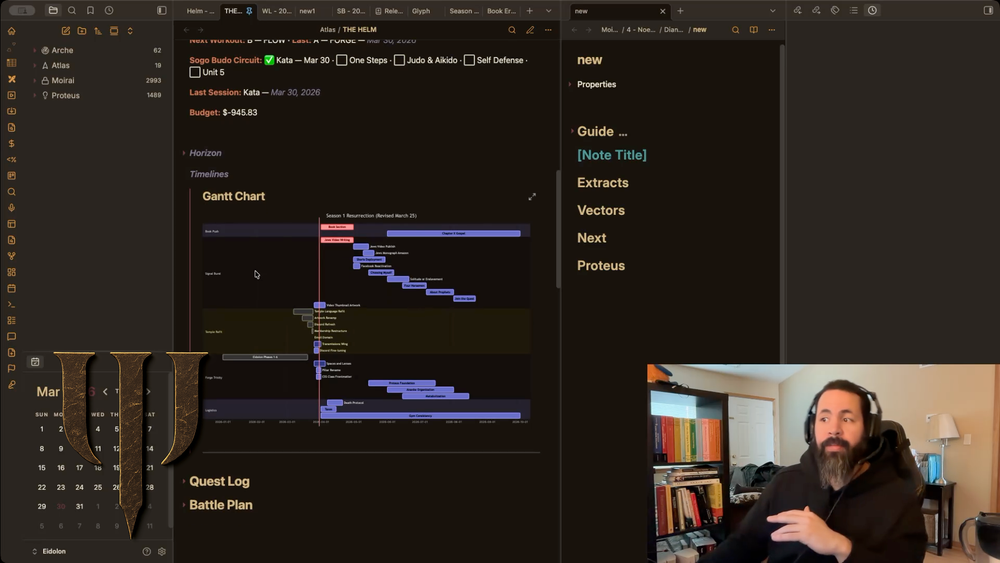
(04:02) So let me jump in and just show you like a very brief highle overview. So what we're looking at right now is what I call the helm. This is the main sort of operational cockpit of the entire system. And this emerged from a need that I had. I was fragmented across a bunch of different apps. And I was trying to, you know, when I was a when I was in high school, I graduated bottom half of my high school class.
(04:33) And then at some point in college, I learned how to get organized. And it just relieved me. It was like a like this enormous weight was lifted off of me. And for the first time, it's like whenever your kitchen is messy, it's overwhelming to go use it. But whenever it's well thought out and it's well organized and it's clean, it is something that you're actively attracted to.
(04:53) You actually want to inhabit that space. You actually want to it's a delight to use. And so I had built several different systems that helped alleviate the stress of trying to organize everything in your head. But those were things I that made me successful whenever I was a 20-year-old. And over the past several months, I've been rethinking through every aspect of my life to try to rebuild everything from the ground up.
(05:20) And I was frustrated with being fragmented across a bunch of different apps for all my different needs. I'll tell the story another time, but the result of what I did was I built this app for myself and I've been loving it. So I'll just briefly highle go over what all these things do without getting too overwhelming.
(05:35) So if you look at the top left, the system is organized across four axes. RK to keep it brief is about future intention. Is about how do you organize your will? How do you organize your action? How do you move toward goals and milestones across different temporal lengths, right? From like long-term five years out, what about five weeks out? And then how do you remember to do that random task that needs to be done on next Thursday? So AR is all about task and project management.
(06:10) You know what if it's a project or what if it's just a quick little errand that you need to do? How do you organize that and keep yourself sane? I'll keep it simple. Atlas is about navigation through the system. Atlas is a book of maps. And I'll give a quick example. Like right now I'm a karate black belt.
(06:29) I should be darn near a kar I should should be darn near a judo black belt but that's a story for another time. I've trained iikido, right? So martial arts is a huge part of my life. And let's say that I want to go practice martial arts. Well, how do I know what to do? Do I go search through my email and try to find the karate handbook that I that I had emailed to me? Or do I maybe go in Google Drive and I try to find the study guide that I put together whenever I was training for black belt? Or what if I could have every document and every resource that
(06:59) I've accumulated over the years at my fingertips? What if I could enter a space and I could see, for example, all of my judo requirements organized by belt level or maybe organized however I want by however I've rated myself in terms of the competence of that technique. So what Atlas is is a book of maps that allow you to enter a particular domain of your life and see everything in a curated space that you would want to have access to if you wanted to engage in that activity.
(07:27) And so for me that space is called dojo. So again high level overview not getting too overwhelming. Moira is about storage, the storage layer, and a traditional and and and you guys, if you've ever seen like other people build life operating systems or knowledge management systems in apps like Notion or Obsidian, this is a an app built on Obsidian.
(07:50) Like I designed the data model, the navigation architecture, the operational logic, the the UI. I built all of this, but you you may see other people build like alternate systems using something like Notion or Obsidian. This is this is mine. But in a traditional knowledge like system, it's a filing cabinet. And this is the example I would use.
(08:08) Let's say that you have a recipe. Um it's a Mexican recipe, yes, but it's also perhaps a paleo recipe. And maybe it's also a favorite recipe. So where do you store that in your system? Do you duplicate it and now it's in three different places? What happens if you want to update the recipe? You want to add or subtract corn from the recipe? Do you now have to go and duplicate your effort in other places in the system? What if you forget to update it here or there? Right? And so without getting into the technicalities of or let's say
(08:36) that you're a knowledge worker and you wanted to use a particular timeline of Roman history and you wanted to use that in an essay, but you also wanted to use it for a tweet that you were making. So then how do you surface that information in a way without duplicating yourself across the system? And without getting into the technicalities, let's just say we've solved that problem.
(08:54) And then the final layer is proteus. That's my personal AI Damon. I will eventually market it as Athena. But the idea is I'll just give a very brief example. Let's say that you have a dream in the middle of the night and uh you log it and I have a a system that makes logging it seamless. You don't have to worry about where it's being stored in the system. It it very effortlessly.
(09:19) It just stores automatically in the right spot for you and has a naming convention for you. And then you have a dream. you you talk about it and then by the time you wake up your AI has analyzed the dream connected it to other dreams saw emerging themes and graded it according to whatever criteria that you would want to have set and then now it's like that half incoherent dream from last night now is become has become meaningful it's become transformed because of the AI again high level don't want to overwhelm so now let me just briefly walk you
(09:49) through the different aspects of my helm and again this is the operational cockpit of what I use every day and that I've been loving. So, without going into too much detail, the map is a recapitulation of Atlas. It's what allows me to enter the system to do different activities. So, if I open this menu spaces, I see that I have the dojo for martial arts.
(10:12) And if I want to work on my book, I go into the bookspace and I find everything I need at a glance. And there's other different ways to navigate, but we won't go into into that too much. Now the status panel the idea here is how do I get a snapshot of where my life state is across like anything. I open the status panel and I can see like my life is organized by era by season.
(10:34) I can see the highest level is era. What are my milestones in this particular season? What am I hoping to accomplish and within a season? What are different initiatives I have? And then I have like a battle plan as my weekly planning surface. I'll talk about that briefly. I can set my intention. And I can see that my intention is to focus on writing, going to the gym because I haven't been working out and working on the Quest forum stuff.
(10:56) And then I can also see what my next workout is. Uh I can see um how many workouts I've done in my martial arts circuit. I can see what my budget is. I can very quickly at a glance see everything. And I won't demonstrate it too much because I don't want to get into the details. But I can hit a button and I can very quickly I'll just do it.
(11:18) Hopefully it works. I'm like I I had to like mod modify some things because I'm I'm like, you know, this is my personal system. I don't want to mess it up. So I come here. I want to log a workout. Let's say I do this. Let's say that I did my workout today. Whatever. It's there. I log whatever I need to do. I come back to the helm.
(11:38) And then now you see it logged that I did the workout today on March 30th and it shows me my next workout's going to be a yoga flow or whatever. Again, keeping it high level. High level. I could easily get lost here. Now horizon is interesting. This is what like you have an upcoming some like a date that you want to remember or some just what's on the horizon like what do you need to be mindful of as say you're planning your week.
(12:05) Like if I want to get one snapshot, I can quickly say, "Oh, this is my ne next workout, or that's where my budget is," or, "Oh, these are the important dates that are that are coming up." I can see all of that at a glance. And then I can see timelines. I can see a Gant chart of all of my different projects. I absolutely love this.
(12:23) Being able to visualize where you're at with everything that you're building is incredibly just amazing to have. Now, that's all in the status panel. And I'm using this on my MacBook Air and I had to modify a few things. So it might be the performance might be a little bit weird, but it works great and it works just as well on mobile.
(12:44) Let me do this. So in my quest log, let me just take a step back and explain this very briefly. So when you play a video game, and I'll do this real quick. When you play a video game, right? Let's say that you're in town A and you meet a baker and the baker says, "Oh, there's something for you to go do in town B.
(13:07) " Well, let's say that you get on your horse and you're on your way to town B, but then you get distracted on some sort of side quest and you know, you see two people fighting. you you you get involved and then maybe you like learn that you need to fight a boss and then to fight that boss you have to go farm some mushrooms and then while you're farming mushrooms you find a really cool piece of armor.
(13:32) So it's and maybe that piece of armor is what helps you progress the main quest. So then how do you remember eight hours later or eight days later you set the video game down, you went and did something and then it's like eight months later. How do you remember that you talked to the baker in town A and that you need to do town B? Well, that's what a quest log is in video games.
(13:49) The idea is how do you reduce the cost of re-entry into an activity? And so with our lives, I think it's the same thing. It's like how do you remember where you left off with a project, with a task? How do you keep track of all of that? And like in a video game, you explore the the world. You explore different areas and you you find different points of interest and you want to be able to keep track of where you've been and what you need to do.
(14:14) And a quest log is what enables you to keep track of all of that. And that's what I built for myself. I won't go into too many of the technical details, but I basically created a quest log for myself so that my life's like a video game. I can come in here and I'll show you guys very briefly and I can see like my active arcs and I can see like, oh, these are the active projects I currently have.
(14:36) I can see what they are. I can see what's next. And it's really easy to manage how this populates. I can see what's next for each one of these tasks. I can see the target date that I have for finishing the task. So, that's nice. And then I won't over explain everything, but I can see initiatives, which are like groups of tasks.
(14:54) Like, what if you have four different projects that are all part of a mega or like part of a bigger project? Well, you can see that here. Or let's say that you have tasks that are not necessarily active, but they're certainly live. You know, they're they're they're currently happening, but they're not your main focus. That's what live is.
(15:09) Or let's say that you have tasks that are on deck. they're upcoming uh but they're not currently active or let's say that you're you want to make a project. Okay, that's staging. And then I have a thing called the Q. And the Q is just a simple lower friction capture of random to-dos that you might want to do.
(15:28) And I have different ways I'm going to organize this. But right here, I have the task Q and I can just scroll through it and see what I need to do whenever I have time. And so let me just show you how I can add to that real quick and I won't get too far into it. add a task. I can just add it here and I can tag it eventually and do something with those tags and then as you see here it's added to the task queue and it works just as seamless on your phone and then eventually your AI layer can remind you like you can organize all your tasks by
(15:56) tag or you can have you know if it's timesensitive your AI can remind you to do it. won't go into the technical details, but there's that. And I have like if I have a completed project, I can see it here. And again, like I said, the performance is weird on my MacBook Air and because I had to do something because I don't want to but it'll come up. It'll fix itself.
(16:15) Here we go. Now, without getting into a whole lecture as to what this is, whenever it decides it wants to load itself and work. Okay, here we go. So, uh, battle plan. This is like what I call my weekly thing. This is this is what worked for me in college. I won't give the whole story, but uh I like I used to like organizing my life by week, but here are some lessons I've learned over over time.
(16:59) It's like, okay, whenever you attach too strongly to the weekly structure, say with a workout, what ends up happening is let's say that you miss your Tuesday workout. And if you're like me, you're like all or nothing. Oh, my week's ruined. Or maybe you have like this weird moral energy. You feel like you need to make up your workout.
(17:15) And then that quickly spirals out of control and then next thing you know it's like you've given up on your whole week and you tell yourself I'll you know I'll make sure I get back on track on Monday and then it just keeps happening. Maybe you Monday goes well, maybe Tuesday goes well but then Wednesday collapses and now you're just in this cycle of guilt.
(17:31) And so what I did when I built this system was re-examine every system I've been using my entire life and rebuild it from the ground up to avoid all of these typical traps. And so the system that I've built isn't just technical. It isn't just it's a thousands of different hundreds thousands maybe of different design decisions.
(17:55) And what I've tried to build here is not just like an app that helps you get organized, but also systems that help you organize your own mind and intention that reduce friction, that reduce context switching, that reduce the the pitfalls that come with, you know, h feeling like you fell off track. And so rather than that, it the system is designed around rather than beating yourself up over what you promised your future self that you would do.
(18:24) No, no, no, no, no. Look, if you have a bad day, you have a bad week, you missed two, three days or whatever, the system is just where did you leave off? What's next? That's what this system is designed to be. And so with the battle plan, the reality is, as much as I've detached myself from the week as an organizing structure, the reality is some days you really do need to plan out a Tuesday.
(18:47) And so this this allows me to have that that daily planning surface if I need it. And so I tried to create a system where everything is here. I I'll sort of wrap up the video here without I could easily go on and on and on and on and on. But uh that's the idea. This is the main operational center of my system. I've been personally loving it.
(19:11) For me, being able to see everything in one spot is really where the power lies. To know that I can go to one place and very quickly see any different scope of my life clearly articulated. I can just pick right back up with whatever it is that I needed to do that I can just find out real quick, you know, what I should do next.
(19:34) Or I can just enter a space real quick that's already curated. that reduces the friction of having to remember what it is I left off with. I love it. And so I'm so excited because what's crazy is for so many years all of these projects seemed so distant in the future and everything's converging at this particular moment where I've made enough progress to tangibly have something the website to show people what I'm building where I have my own app that I don't know if I mentioned it I had like eight or nine00 Evernote notes and 10 years ago I tried to create this whole tagging
(20:10) system. I had 1,390 Google documents. I was spread out across a bunch of different apps. And so I built this in response to a need. And that need was to be able to to write my book the best way possible. And that required that all of those insights that I've had over the past decade that I've been storing that they don't just get lost.
(20:33) That I'm able to surface them when I need to. That I'm able to have the things that I need when I need them the most. And that's why I built this out of my own necessity. And I was maybe 90% done building it when I realized other people might really like this. And so that's like the longer term vision. So anyway, four mega projects, the book, the YouTube content, um this app that I've built, and the temple structure.
(21:06) So this was part of Forge Trinity. The next step for me, I'm mostly done with this, is to build out the AI Damon layer, Proteius, or for others, Athena. And I'm so excited about that. I started working on that back in October. I cannot wait to start working on that. Um, and then the last layer is an preservation layer. Basically, it's a glorified name for what what's called a network attached storage device.
(21:36) So maybe you have Google Drive or you have Dropbox. So rather than relying on their services, I have my own Google Drive. I have my own Dropbox. And so it's going to be um backed up on the cloud in an encrypted form. And I I and even without that, I'm able to access all of my files across any system, my PC, my MacBook Air, my MacBook Pro, my phone, my iPad, and I can access it from anywhere in the world.
(22:03) So, I wanted to build a prototype for the future where our lives inevitably are going to become digitized and I wanted to give people their their sovereignty and dignity back. And I'm just super excited to have built this. I've been loving using it. And anyway, and I hope one day to be able to offer this to others that are part of the community and maybe even build this out as a product for others.
(22:25) So, anyway, that's enough for now. Uh, if you guys want to keep up with everything, you guys can find the the the link to the quest form in the description below. And I'll see you guys hopefully sooner than hopefully in the near future.